SUPERPOWER / 01
Lives in the notch
An always-on layer pinned over the notch — no Dock icon, no window. Collapsed it's a static layer at 0 fps and ~zero GPU; Aurora and Liquid Glass only exist while you interact.
THE ONE WITH A PLACE FOR EVERYTHING
 Cortex Shelfv0.3.20
A productivity layer that lives permanently in the Mac notch — shelf, smart clipboard, quick notes, drop zone, and screenshots. No windows, no login, no telemetry.
Fresh from the lab: what’s new in v0.3.20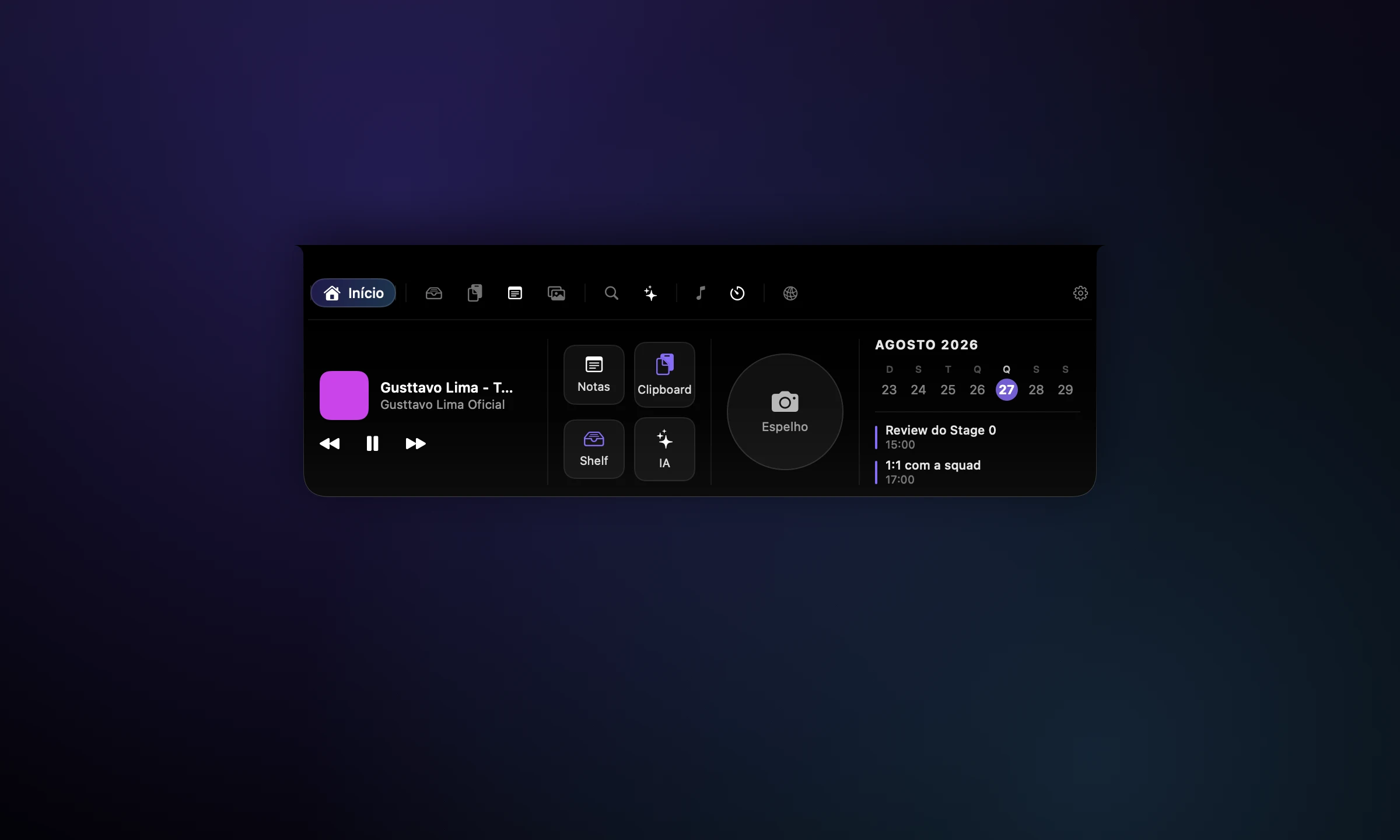
Finally, a useful place for all those little things.
yes, that screenshot has a home now.
01 / MORE THAN A PRETTY ICON
6 ways to make your day easier.
Yes, we got a little carried away.
An always-on layer pinned over the notch — no Dock icon, no window. Collapsed it's a static layer at 0 fps and ~zero GPU; Aurora and Liquid Glass only exist while you interact.
Park files, text, and links on a shelf that's one gesture away — a staging spot for whatever you're moving between apps.
A searchable history of everything you've copied, so the thing you grabbed five minutes ago is still one keystroke away.
Go on. Open one.
Jot a note without breaking flow, and drag files into a drop zone that holds them until you're ready to file them.
Capture, collect, and drag out screenshots from one place in the notch instead of hunting across your desktop.
Everything runs on your Mac with no account and no telemetry — your shelf, clipboard, notes and screenshots never leave it.
A closer look at what makes Cortex Shelf tick.
Cortex Shelf turns the notch into a productivity surface that's always there and never in the way. Park files and snippets on the Shelf, recall everything you copied from a smart clipboard, jot quick notes, drop files into a staging zone, and capture screenshots — all without a window or a login. A companion face reacts to what you do, and when more than one thing is live — music, a focus session, a call, today's next event — a switcher lets you move between them without opening the panel. It's local-first by design (no account, no telemetry) and obsessively lightweight: collapsed 99% of the time, the notch is a static layer that burns zero GPU, and the Aurora + Liquid Glass interface only renders while you're interacting.
02 / LET’S MAKE THIS OFFICIAL
A few practical details.
No awkward first-date questions.
THE COMPATIBILITY CHECK
For macOS.
Made to feel right at home.
YOUR NEXT FAVORITE TOOL IS RIGHT HERE.
Your files, notes, and copied things. Finally in the same neighborhood.
THERE’S MORE WHERE THAT CAME FROM

Your AI agent, living in your menu bar.

Your servers. Your cloud. Zero complexity.

Your whole restaurant. One happy place.

Kafka and RabbitMQ, from a guy who can't lie.

One beautiful client for every database.

Kubernetes, without the 500 MB suit.
Memory that remembers what matters.